> ## Documentation Index
> Fetch the complete documentation index at: https://docs.mcpjam.com/llms.txt
> Use this file to discover all available pages before exploring further.
# XAA Debugger
> Configure and debug Cross-App Access flows with MCPJam as the test identity provider and client/agent
The XAA (Cross-App Access) Debugger tests an MCP server and its authorization setup.
MCPJam acts as both:
* The **identity provider**, which signs the ID token and ID-JAG.
* The **client/agent**, which presents the ID-JAG and uses the access token.
## Before You Run the Test
### Trust MCPJam's Identity Provider
The XAA Flow header shows three URLs:
| URL | Purpose |
| ----------------- | ---------------------------------------------------- |
| **Issuer URL** | The issuer MCPJam puts in its signed tokens. |
| **OpenID Config** | Metadata describing the issuer and its signing keys. |
| **JWKS URL** | MCPJam's public signing keys. |
Configure your authorization server with the values it requests. The **Issuer URL** identifies MCPJam's test identity provider, the **OpenID Config** URL provides discovery metadata, and the **JWKS URL** provides the public signing keys.
### Local and hosted issuers
If MCPJam is running locally and your authorization server is hosted in the
cloud, turn on **Use hosted issuer** in the XAA Flow header. A cloud server
cannot reach a local Issuer URL.
### Other header controls
The header also has an **Identity assertion** (OIDC / SAML) toggle that sets the format MCPJam mints, covered under [Identity assertion format](#identity-assertion-format). It also has a **[Run as](#simulated-identity)** control for choosing the simulated identity.
## Add Your MCP Server
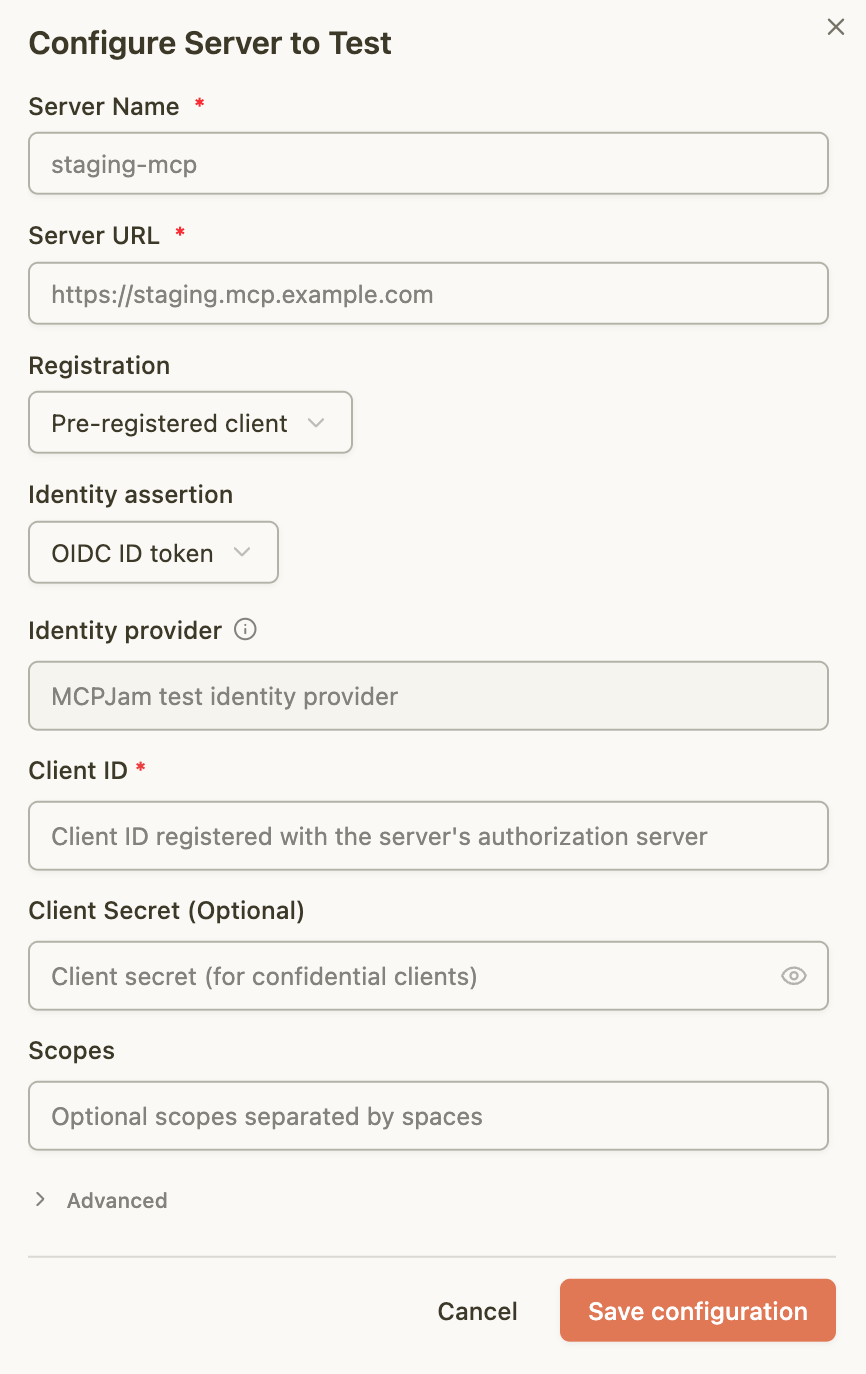
Select **Configure Server to Test** (or **Add Server**), enter the MCP server name and URL, then choose how MCPJam identifies itself to the authorization server.
### Server Configuration
#### Registration Method
* **Pre-registered client:** Register MCPJam in your authorization server first,
then enter the client ID and optional client secret it gives you.
* **Client metadata URL (CIMD):** MCPJam uses a client metadata URL as the
client ID. Your authorization server must advertise CIMD support. The
**Client authentication** control chooses whether MCPJam proves it owns that
identity:
* **Public (no client auth):** Your authorization server takes the metadata
URL at face value. Nothing proves MCPJam owns that identity. This is the
default.
* **Confidential (private\_key\_jwt):** MCPJam holds a private key and signs
each token request with it, proving it owns the identity. Choose this when
your authorization server requires a confidential client. In the hosted
inspector, this option requires you to be signed in with an active
organization; MCPJam probes for the capability automatically and blocks
Start/Run with a clear message if the requirement is not met.
* **Open dynamic registration (DCR):** MCPJam registers a client during the
test. Your authorization server must provide an open registration endpoint.
#### Identity assertion format
Choose the protocol MCPJam's identity provider uses to authenticate users.
* **OIDC ID token:** MCPJam mints an OIDC ID token as the identity assertion.
This is the default.
* **SAML assertion:** MCPJam mints a signed SAML 2.0 assertion, and the ID-JAG
carries a `saml-nameid` subject identifier so a SAML-federated server can
resolve the user.
#### Scopes
Enter optional permissions separated by spaces. MCPJam includes them when
requesting the ID-JAG and access token.
### Advanced Settings
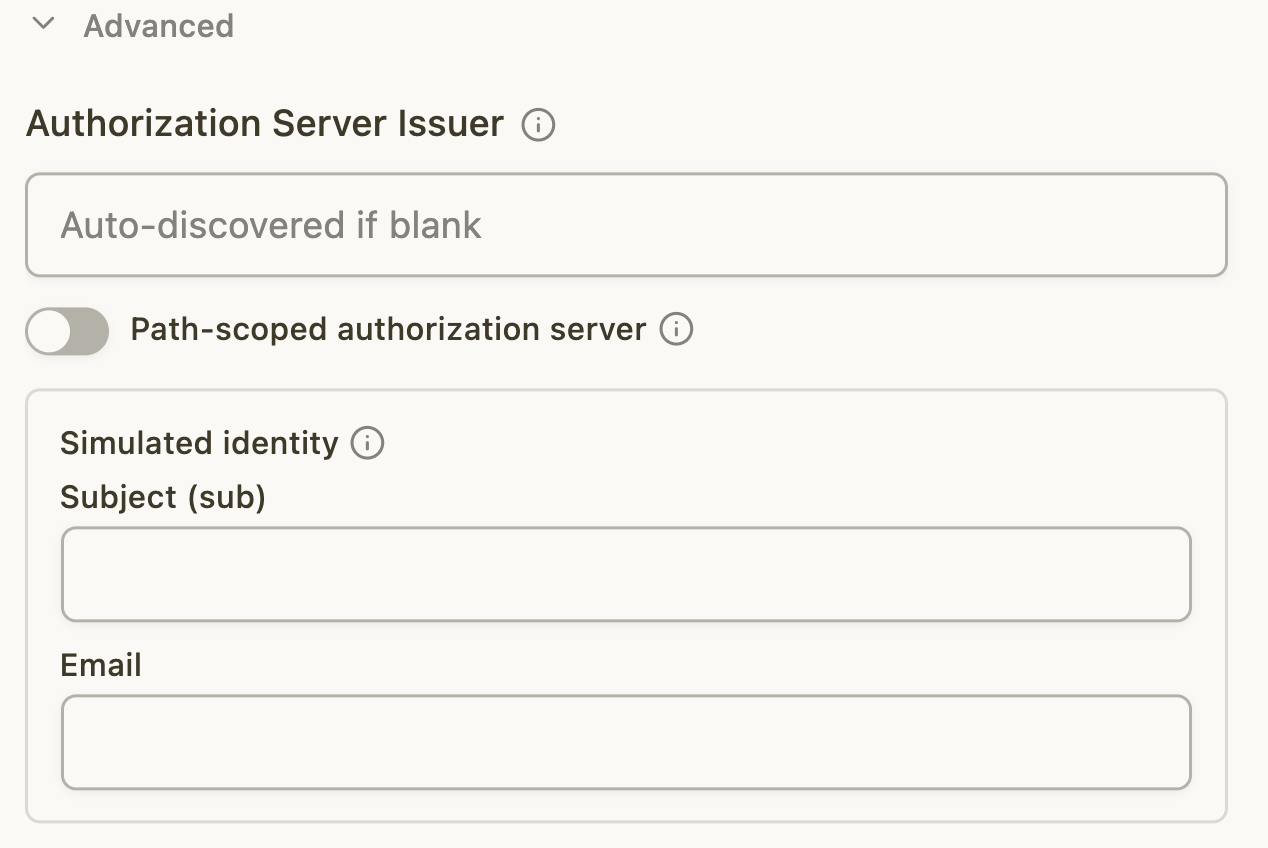
#### Authorization Server Issuer
Leave it blank to use the authorization server MCPJam discovers from the MCP
server. Enter a URL to use a different authorization server.
#### Path-scoped authorization server
Keep this off for normal RFC 8414 behavior. Turn it on only when the discovered
URL and metadata issuer differ on the same origin.
#### Simulated identity
Choose the user MCPJam puts in the ID token. Leave the fields blank to use a
built-in demo user (`user-12345` / `demo.user@example.com`).
## Inspect the ID-JAG
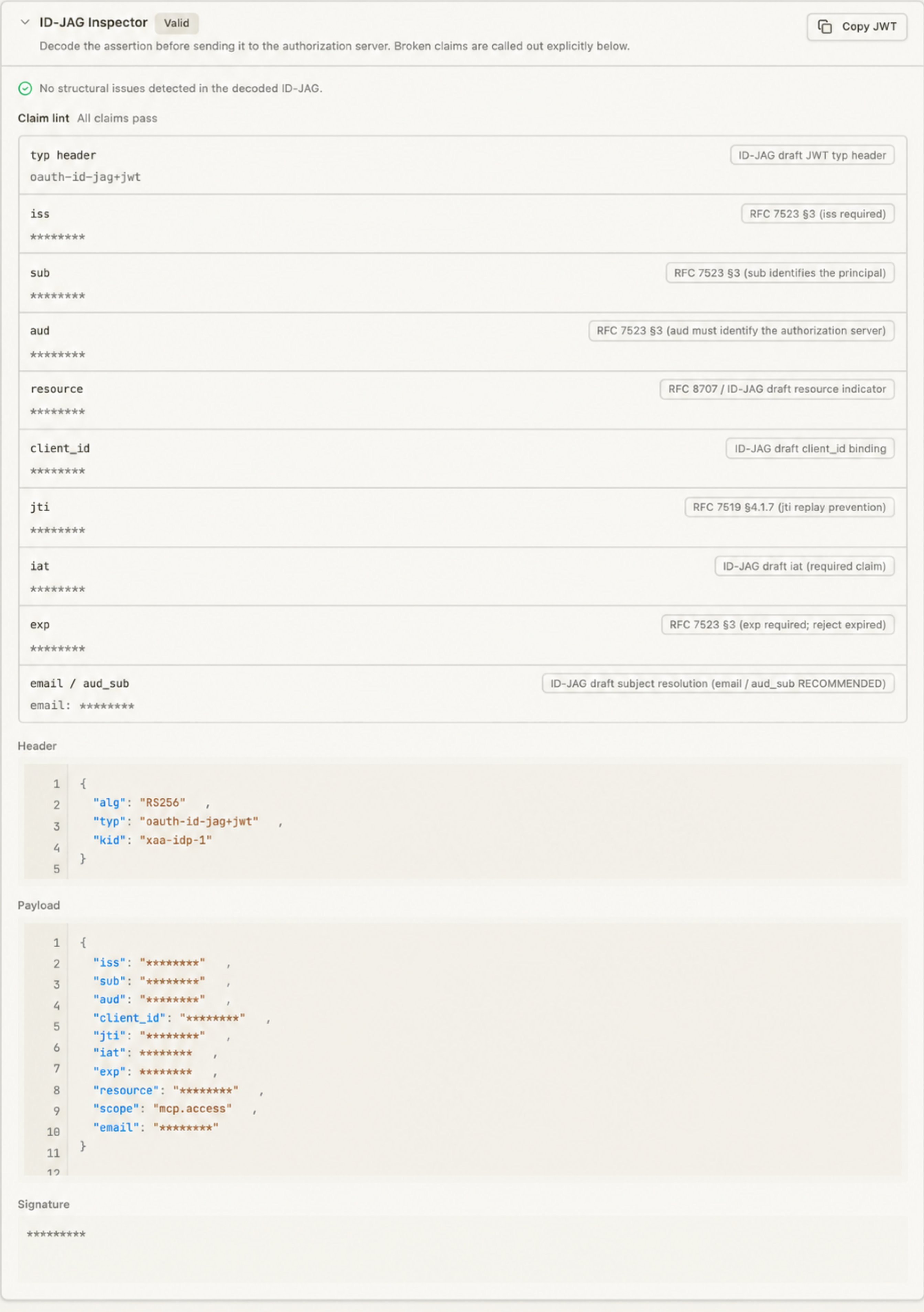
Before MCPJam sends the ID-JAG to the authorization server, the right panel
opens the **ID-JAG Inspector**. Use it to inspect exactly what MCPJam created
and identify problems before the token exchange. MCPJam checks each piece of
information inside the ID-JAG and shows whether it looks correct or broken. It
also shows the relevant RFC or ID-JAG requirement for each check.
### Header
The JWT header shows:
* `alg`: the signing algorithm.
* `typ`: the token type.
* `kid`: the signing key identifier.
### Payload
The payload shows the values MCPJam puts into the ID-JAG:
| Claim | What it identifies |
| ----------------------- | ------------------------------------------------------- |
| `iss` | MCPJam's test identity provider |
| `sub` and `email` | The test user's identity |
| `aud` | The authorization server that should receive the ID-JAG |
| `resource` | The MCP server the access is for |
| `client_id` | The client identity used in the test |
| `jti`, `iat`, and `exp` | Replay protection and token lifetime |
| `scope` | The permissions requested for the MCP server |
### Signature
The inspector shows the signed JWT and provides **Copy JWT** for further
inspection. The authorization server verifies the signature using MCPJam's
public signing keys.
## Negative Tests
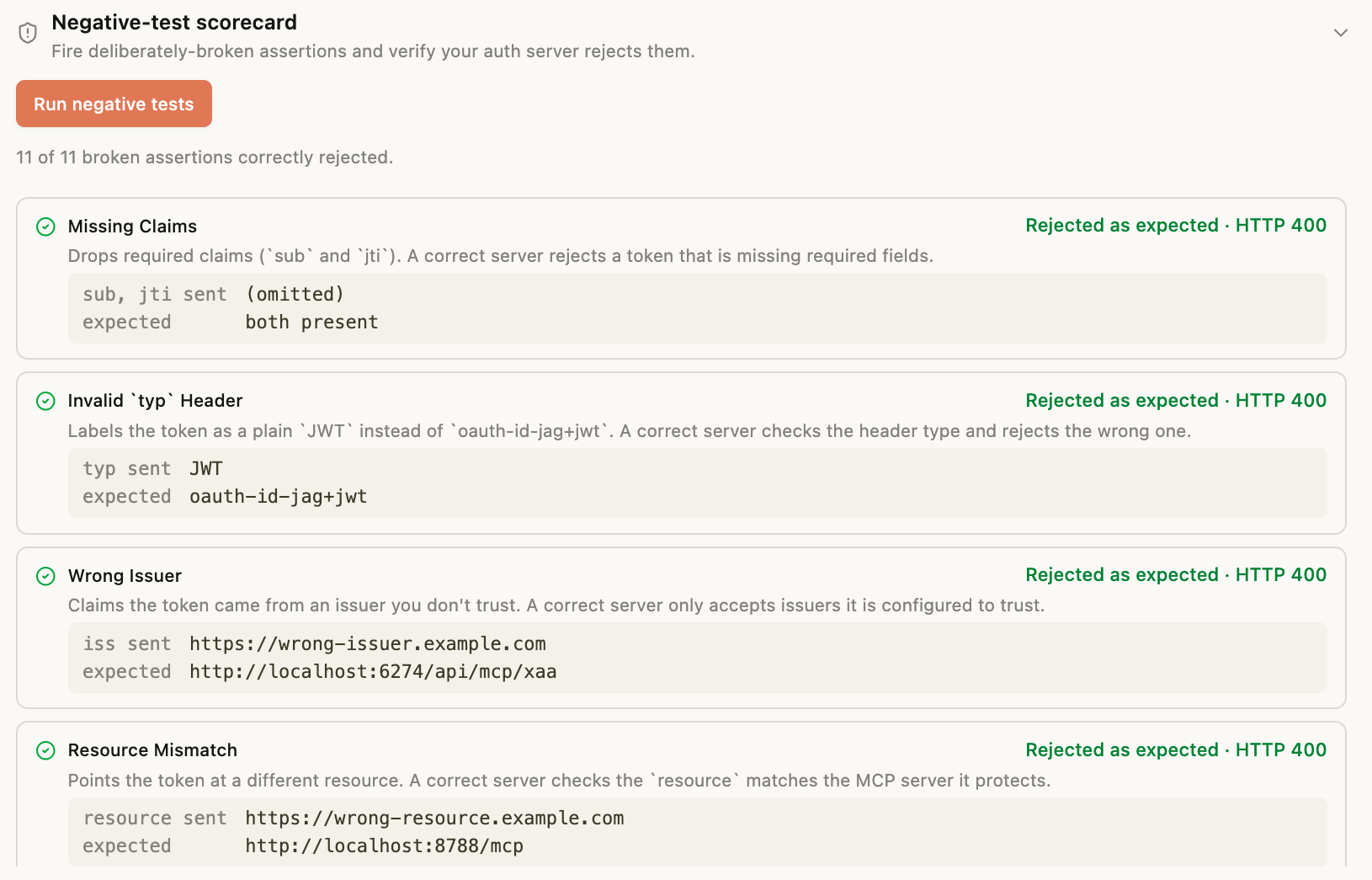
Checks that your authorization server rejects broken ID-JAGs. Run a successful
flow first, then click **Run negative tests**. A strict check passes when the
authorization server rejects the broken assertion. The MCP server is not called
during these checks.
The scorecard runs these strict rejection checks:
* Bad Signature
* Wrong Audience
* Expired
* Missing Claims
* Invalid `typ` Header
* Wrong Issuer
* Resource Mismatch
* Client ID Mismatch
* Unknown `kid`
It also reports two policy probes:
* Unknown Subject
* Scope Denial
No pass or fail here. Your server can accept or reject an unknown user, and can
trim the scopes it grants. Just confirm the result is what you expect.
These are targeted security and policy checks, not a full conformance test.
## The XAA Flow
The debugger shows the flow in the sequence diagram and logs each request and response:
1. **Discover the MCP server and authorization server.** MCPJam asks the MCP server which authorization server protects it, then reads the authorization server metadata.
2. **Resolve the client identity.** MCPJam uses the pre-registered client, performs DCR, or uses its CIMD URL.
3. **Simulate sign-in at MCPJam's identity provider.** MCPJam issues a test ID token.
4. **Request an ID-JAG.** MCPJam's identity provider exchanges the ID token for an ID-JAG.
5. **Request an access token using the ID-JAG.** MCPJam sends the ID-JAG to the authorization server's token endpoint using the JWT-bearer grant.
6. **Call the MCP server.** MCPJam sends the resulting access token to the MCP server.
## Debugging Failures
The right panel shows each flow step, its request and response details, and any
available token information. If a step fails, it also provides guidance for
diagnosing the problem. This may include:
* The authorization server does not advertise or accept the JWT-bearer grant.
* MCPJam's issuer or signing keys are not trusted.
* The client identity is missing, unregistered, or not allowed to use the grant.
* The aud, resource, or client\_id claim does not match the authorization server's configuration.
* The authorization server issues a token, but the MCP server rejects it.
Use the compatibility results after discovery and expand each flow step to inspect the exact request, response, and token claims.
## Related Standards
* [MCP Authorization](https://modelcontextprotocol.io/specification/draft/basic/authorization)
* [OAuth 2.0 Authorization Server Metadata (RFC 8414)](https://www.rfc-editor.org/rfc/rfc8414)
* [OAuth 2.0 JWT Bearer Token Grant (RFC 7523)](https://www.rfc-editor.org/rfc/rfc7523)
* [OAuth 2.0 Dynamic Client Registration (RFC 7591)](https://www.rfc-editor.org/rfc/rfc7591)
 | URL | Purpose |
| ----------------- | ---------------------------------------------------- |
| **Issuer URL** | The issuer MCPJam puts in its signed tokens. |
| **OpenID Config** | Metadata describing the issuer and its signing keys. |
| **JWKS URL** | MCPJam's public signing keys. |
Configure your authorization server with the values it requests. The **Issuer URL** identifies MCPJam's test identity provider, the **OpenID Config** URL provides discovery metadata, and the **JWKS URL** provides the public signing keys.
### Local and hosted issuers
If MCPJam is running locally and your authorization server is hosted in the
cloud, turn on **Use hosted issuer** in the XAA Flow header. A cloud server
cannot reach a local Issuer URL.
| URL | Purpose |
| ----------------- | ---------------------------------------------------- |
| **Issuer URL** | The issuer MCPJam puts in its signed tokens. |
| **OpenID Config** | Metadata describing the issuer and its signing keys. |
| **JWKS URL** | MCPJam's public signing keys. |
Configure your authorization server with the values it requests. The **Issuer URL** identifies MCPJam's test identity provider, the **OpenID Config** URL provides discovery metadata, and the **JWKS URL** provides the public signing keys.
### Local and hosted issuers
If MCPJam is running locally and your authorization server is hosted in the
cloud, turn on **Use hosted issuer** in the XAA Flow header. A cloud server
cannot reach a local Issuer URL.
 ### Other header controls
The header also has an **Identity assertion** (OIDC / SAML) toggle that sets the format MCPJam mints, covered under [Identity assertion format](#identity-assertion-format). It also has a **[Run as](#simulated-identity)** control for choosing the simulated identity.
## Add Your MCP Server
Select **Configure Server to Test** (or **Add Server**), enter the MCP server name and URL, then choose how MCPJam identifies itself to the authorization server.
### Server Configuration
### Other header controls
The header also has an **Identity assertion** (OIDC / SAML) toggle that sets the format MCPJam mints, covered under [Identity assertion format](#identity-assertion-format). It also has a **[Run as](#simulated-identity)** control for choosing the simulated identity.
## Add Your MCP Server
Select **Configure Server to Test** (or **Add Server**), enter the MCP server name and URL, then choose how MCPJam identifies itself to the authorization server.
### Server Configuration
 #### Registration Method
* **Pre-registered client:** Register MCPJam in your authorization server first,
then enter the client ID and optional client secret it gives you.
* **Client metadata URL (CIMD):** MCPJam uses a client metadata URL as the
client ID. Your authorization server must advertise CIMD support. The
**Client authentication** control chooses whether MCPJam proves it owns that
identity:
* **Public (no client auth):** Your authorization server takes the metadata
URL at face value. Nothing proves MCPJam owns that identity. This is the
default.
* **Confidential (private\_key\_jwt):** MCPJam holds a private key and signs
each token request with it, proving it owns the identity. Choose this when
your authorization server requires a confidential client. In the hosted
inspector, this option requires you to be signed in with an active
organization; MCPJam probes for the capability automatically and blocks
Start/Run with a clear message if the requirement is not met.
* **Open dynamic registration (DCR):** MCPJam registers a client during the
test. Your authorization server must provide an open registration endpoint.
#### Identity assertion format
Choose the protocol MCPJam's identity provider uses to authenticate users.
* **OIDC ID token:** MCPJam mints an OIDC ID token as the identity assertion.
This is the default.
* **SAML assertion:** MCPJam mints a signed SAML 2.0 assertion, and the ID-JAG
carries a `saml-nameid` subject identifier so a SAML-federated server can
resolve the user.
#### Scopes
Enter optional permissions separated by spaces. MCPJam includes them when
requesting the ID-JAG and access token.
### Advanced Settings
#### Registration Method
* **Pre-registered client:** Register MCPJam in your authorization server first,
then enter the client ID and optional client secret it gives you.
* **Client metadata URL (CIMD):** MCPJam uses a client metadata URL as the
client ID. Your authorization server must advertise CIMD support. The
**Client authentication** control chooses whether MCPJam proves it owns that
identity:
* **Public (no client auth):** Your authorization server takes the metadata
URL at face value. Nothing proves MCPJam owns that identity. This is the
default.
* **Confidential (private\_key\_jwt):** MCPJam holds a private key and signs
each token request with it, proving it owns the identity. Choose this when
your authorization server requires a confidential client. In the hosted
inspector, this option requires you to be signed in with an active
organization; MCPJam probes for the capability automatically and blocks
Start/Run with a clear message if the requirement is not met.
* **Open dynamic registration (DCR):** MCPJam registers a client during the
test. Your authorization server must provide an open registration endpoint.
#### Identity assertion format
Choose the protocol MCPJam's identity provider uses to authenticate users.
* **OIDC ID token:** MCPJam mints an OIDC ID token as the identity assertion.
This is the default.
* **SAML assertion:** MCPJam mints a signed SAML 2.0 assertion, and the ID-JAG
carries a `saml-nameid` subject identifier so a SAML-federated server can
resolve the user.
#### Scopes
Enter optional permissions separated by spaces. MCPJam includes them when
requesting the ID-JAG and access token.
### Advanced Settings
 #### Authorization Server Issuer
Leave it blank to use the authorization server MCPJam discovers from the MCP
server. Enter a URL to use a different authorization server.
#### Path-scoped authorization server
Keep this off for normal RFC 8414 behavior. Turn it on only when the discovered
URL and metadata issuer differ on the same origin.
#### Simulated identity
Choose the user MCPJam puts in the ID token. Leave the fields blank to use a
built-in demo user (`user-12345` / `demo.user@example.com`).
## Inspect the ID-JAG
#### Authorization Server Issuer
Leave it blank to use the authorization server MCPJam discovers from the MCP
server. Enter a URL to use a different authorization server.
#### Path-scoped authorization server
Keep this off for normal RFC 8414 behavior. Turn it on only when the discovered
URL and metadata issuer differ on the same origin.
#### Simulated identity
Choose the user MCPJam puts in the ID token. Leave the fields blank to use a
built-in demo user (`user-12345` / `demo.user@example.com`).
## Inspect the ID-JAG
 Before MCPJam sends the ID-JAG to the authorization server, the right panel
opens the **ID-JAG Inspector**. Use it to inspect exactly what MCPJam created
and identify problems before the token exchange. MCPJam checks each piece of
information inside the ID-JAG and shows whether it looks correct or broken. It
also shows the relevant RFC or ID-JAG requirement for each check.
### Header
The JWT header shows:
* `alg`: the signing algorithm.
* `typ`: the token type.
* `kid`: the signing key identifier.
### Payload
The payload shows the values MCPJam puts into the ID-JAG:
| Claim | What it identifies |
| ----------------------- | ------------------------------------------------------- |
| `iss` | MCPJam's test identity provider |
| `sub` and `email` | The test user's identity |
| `aud` | The authorization server that should receive the ID-JAG |
| `resource` | The MCP server the access is for |
| `client_id` | The client identity used in the test |
| `jti`, `iat`, and `exp` | Replay protection and token lifetime |
| `scope` | The permissions requested for the MCP server |
### Signature
The inspector shows the signed JWT and provides **Copy JWT** for further
inspection. The authorization server verifies the signature using MCPJam's
public signing keys.
## Negative Tests
Before MCPJam sends the ID-JAG to the authorization server, the right panel
opens the **ID-JAG Inspector**. Use it to inspect exactly what MCPJam created
and identify problems before the token exchange. MCPJam checks each piece of
information inside the ID-JAG and shows whether it looks correct or broken. It
also shows the relevant RFC or ID-JAG requirement for each check.
### Header
The JWT header shows:
* `alg`: the signing algorithm.
* `typ`: the token type.
* `kid`: the signing key identifier.
### Payload
The payload shows the values MCPJam puts into the ID-JAG:
| Claim | What it identifies |
| ----------------------- | ------------------------------------------------------- |
| `iss` | MCPJam's test identity provider |
| `sub` and `email` | The test user's identity |
| `aud` | The authorization server that should receive the ID-JAG |
| `resource` | The MCP server the access is for |
| `client_id` | The client identity used in the test |
| `jti`, `iat`, and `exp` | Replay protection and token lifetime |
| `scope` | The permissions requested for the MCP server |
### Signature
The inspector shows the signed JWT and provides **Copy JWT** for further
inspection. The authorization server verifies the signature using MCPJam's
public signing keys.
## Negative Tests
 Checks that your authorization server rejects broken ID-JAGs. Run a successful
flow first, then click **Run negative tests**. A strict check passes when the
authorization server rejects the broken assertion. The MCP server is not called
during these checks.
The scorecard runs these strict rejection checks:
* Bad Signature
* Wrong Audience
* Expired
* Missing Claims
* Invalid `typ` Header
* Wrong Issuer
* Resource Mismatch
* Client ID Mismatch
* Unknown `kid`
It also reports two policy probes:
* Unknown Subject
* Scope Denial
No pass or fail here. Your server can accept or reject an unknown user, and can
trim the scopes it grants. Just confirm the result is what you expect.
These are targeted security and policy checks, not a full conformance test.
## The XAA Flow
The debugger shows the flow in the sequence diagram and logs each request and response:
1. **Discover the MCP server and authorization server.** MCPJam asks the MCP server which authorization server protects it, then reads the authorization server metadata.
2. **Resolve the client identity.** MCPJam uses the pre-registered client, performs DCR, or uses its CIMD URL.
3. **Simulate sign-in at MCPJam's identity provider.** MCPJam issues a test ID token.
4. **Request an ID-JAG.** MCPJam's identity provider exchanges the ID token for an ID-JAG.
5. **Request an access token using the ID-JAG.** MCPJam sends the ID-JAG to the authorization server's token endpoint using the JWT-bearer grant.
6. **Call the MCP server.** MCPJam sends the resulting access token to the MCP server.
## Debugging Failures
The right panel shows each flow step, its request and response details, and any
available token information. If a step fails, it also provides guidance for
diagnosing the problem. This may include:
* The authorization server does not advertise or accept the JWT-bearer grant.
* MCPJam's issuer or signing keys are not trusted.
* The client identity is missing, unregistered, or not allowed to use the grant.
* The aud, resource, or client\_id claim does not match the authorization server's configuration.
* The authorization server issues a token, but the MCP server rejects it.
Use the compatibility results after discovery and expand each flow step to inspect the exact request, response, and token claims.
## Related Standards
* [MCP Authorization](https://modelcontextprotocol.io/specification/draft/basic/authorization)
* [OAuth 2.0 Authorization Server Metadata (RFC 8414)](https://www.rfc-editor.org/rfc/rfc8414)
* [OAuth 2.0 JWT Bearer Token Grant (RFC 7523)](https://www.rfc-editor.org/rfc/rfc7523)
* [OAuth 2.0 Dynamic Client Registration (RFC 7591)](https://www.rfc-editor.org/rfc/rfc7591)
Checks that your authorization server rejects broken ID-JAGs. Run a successful
flow first, then click **Run negative tests**. A strict check passes when the
authorization server rejects the broken assertion. The MCP server is not called
during these checks.
The scorecard runs these strict rejection checks:
* Bad Signature
* Wrong Audience
* Expired
* Missing Claims
* Invalid `typ` Header
* Wrong Issuer
* Resource Mismatch
* Client ID Mismatch
* Unknown `kid`
It also reports two policy probes:
* Unknown Subject
* Scope Denial
No pass or fail here. Your server can accept or reject an unknown user, and can
trim the scopes it grants. Just confirm the result is what you expect.
These are targeted security and policy checks, not a full conformance test.
## The XAA Flow
The debugger shows the flow in the sequence diagram and logs each request and response:
1. **Discover the MCP server and authorization server.** MCPJam asks the MCP server which authorization server protects it, then reads the authorization server metadata.
2. **Resolve the client identity.** MCPJam uses the pre-registered client, performs DCR, or uses its CIMD URL.
3. **Simulate sign-in at MCPJam's identity provider.** MCPJam issues a test ID token.
4. **Request an ID-JAG.** MCPJam's identity provider exchanges the ID token for an ID-JAG.
5. **Request an access token using the ID-JAG.** MCPJam sends the ID-JAG to the authorization server's token endpoint using the JWT-bearer grant.
6. **Call the MCP server.** MCPJam sends the resulting access token to the MCP server.
## Debugging Failures
The right panel shows each flow step, its request and response details, and any
available token information. If a step fails, it also provides guidance for
diagnosing the problem. This may include:
* The authorization server does not advertise or accept the JWT-bearer grant.
* MCPJam's issuer or signing keys are not trusted.
* The client identity is missing, unregistered, or not allowed to use the grant.
* The aud, resource, or client\_id claim does not match the authorization server's configuration.
* The authorization server issues a token, but the MCP server rejects it.
Use the compatibility results after discovery and expand each flow step to inspect the exact request, response, and token claims.
## Related Standards
* [MCP Authorization](https://modelcontextprotocol.io/specification/draft/basic/authorization)
* [OAuth 2.0 Authorization Server Metadata (RFC 8414)](https://www.rfc-editor.org/rfc/rfc8414)
* [OAuth 2.0 JWT Bearer Token Grant (RFC 7523)](https://www.rfc-editor.org/rfc/rfc7523)
* [OAuth 2.0 Dynamic Client Registration (RFC 7591)](https://www.rfc-editor.org/rfc/rfc7591)