

Key Features
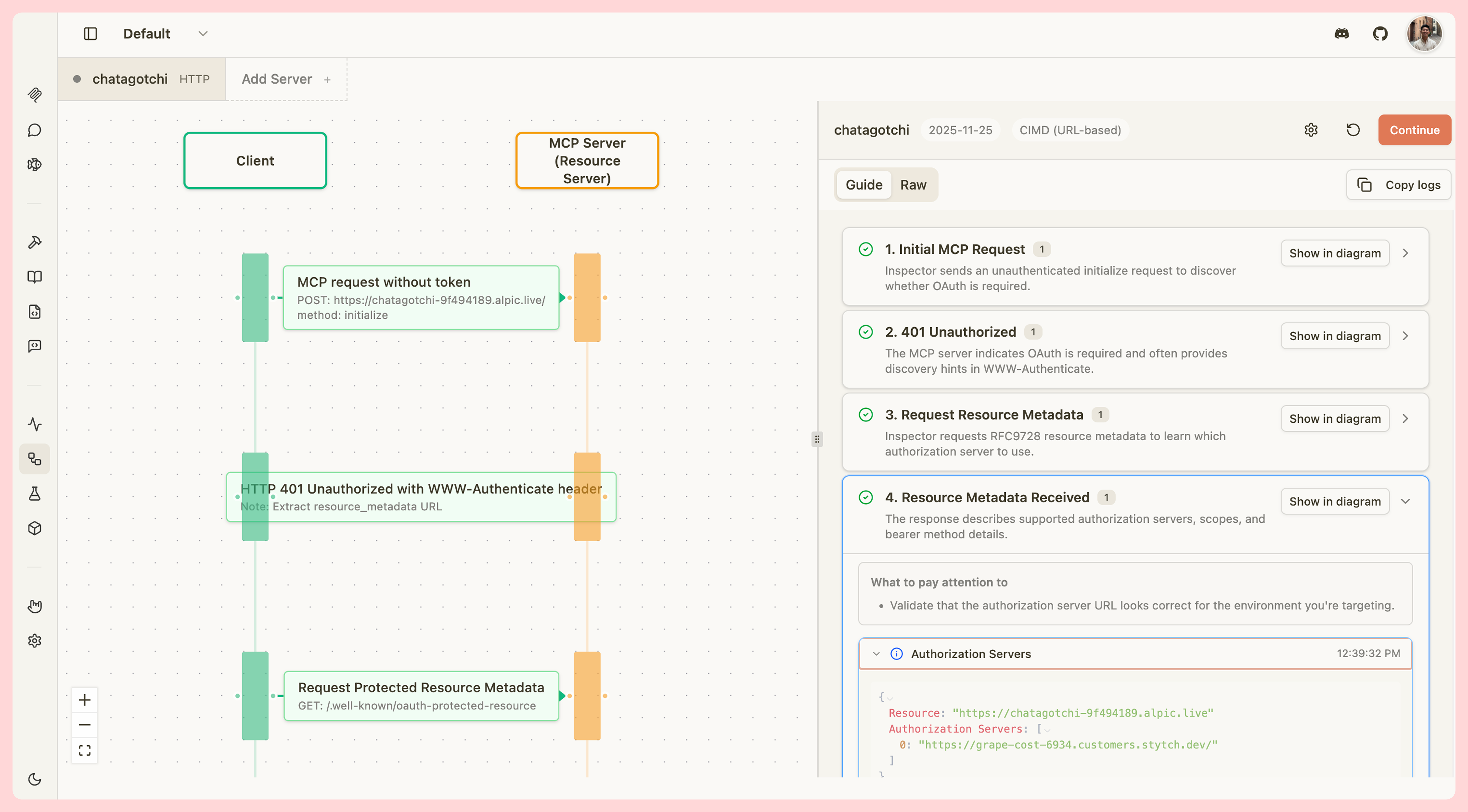
The OAuth Debugger includes:- Visual Step-by-Step Guide - Interactive flow guide with detailed explanations for each OAuth step
- Multi-Protocol Support - Test against OAuth spec versions 03-26, 06-18, 11-25, and 2026-07-28 (Latest)
- Full Registration Methods - Support for client pre-registration, Dynamic Client Registration (DCR), and Client ID Metadata Documents (CIMD)
- Network Inspection - View all HTTP requests and responses with headers and body content
- Educational Context - Built-in teachable moments and tips for common OAuth issues
- Sequence Diagram - Visual representation of the OAuth flow synchronized with your progress, showing the exact resource value the flow sends
- Export Capabilities - Copy logs in guide or raw format for debugging and documentation
Resource indicator warnings
When the server’s Protected Resource Metadata (PRM) advertises aresource identifier that does not fully satisfy RFC 9728 — for example, a same-origin resource on a different path than the transport endpoint — the debugger logs a warning at the received_resource_metadata step and continues the flow. The warning includes the advertised value, the server URL, and whether strict MCP clients (such as Quick OAuth or the official MCP SDK) will refuse to connect.
The debugger intentionally proceeds rather than failing so you can observe real server behavior. Use the OAuth Conformance tool if you need strict RFC 9728 validation.
Path-scoped authorization servers
Some multi-tenant authorization servers (such as Scalekit) scope their OAuth endpoints under a path — for examplehttps://<env>.example.com/resources/res_x — while their metadata advertises the origin root as the issuer. By default, Inspector enforces the RFC 8414 §3.3 requirement that the advertised issuer exactly matches the URL discovery started from, so those servers fail discovery with an error that names the mismatch.
To connect to a path-scoped authorization server, enable the Path-scoped authorization server switch in Advanced settings:
- In the OAuth Debugger, open the Configure dialog and expand Advanced settings.
- In the Connect server form, open Authentication → Advanced settings.
- The advertised issuer must be a same-origin, segment-aware path-prefix ancestor of the discovery URL. For example,
/resourcesis accepted as an ancestor of/resources/res_x, but/resources-evilis not. - The
token_endpointandregistration_endpointin the server’s metadata must stay on the advertised issuer’s own origin. A present endpoint that points off-origin is rejected even with the toggle on. - A query string or fragment on either side of the comparison disqualifies the relaxation (RFC 8414 §2 forbids both in an issuer identifier).
- Cross-origin issuers are always rejected.
Authorization-response iss mismatch warnings
When the authorization server returns an iss parameter on the callback that does not match the issuer recorded from its metadata, Inspector’s behavior depends on the protocol version selected for the flow:
- 2026-07-28 (Latest) — The flow is blocked before the authorization code is redeemed. The error names both the recorded issuer and the one returned on the callback so you can compare them directly.
- 2025-11-25 and earlier — The flow continues and a warning toast is shown naming both issuers. These protocol versions do not mention
issor RFC 9207 issuer validation, so blocking would enforce a rule the selected version does not contain.
received_authorization_code step, visible in the Last OAuth Trace panel.
Inline OAuth tracing
When you connect a server using OAuth 2.0, Inspector automatically records a trace of every step in the flow and surfaces it in the connection UI — no separate tool required. On the connection card, if OAuth fails, a banner identifies the exact step where the failure occurred (for example, “OAuth failed during Token Request”). In the server detail panel, the Last OAuth Trace section is collapsed by default. Click the chevron next to Last OAuth Trace to expand it. Inside, each step and the HTTP History log are also collapsed by default — error steps open automatically so failures are immediately visible. The section shows:- Each OAuth step (discovery, client registration, PKCE, authorization redirect, token exchange) with a status indicator and message
- The error text for any failed step
- An HTTP History log of every request and response, with tokens and secrets automatically redacted
Getting Started
To begin debugging OAuth flows:- Navigate to the OAuth Debugger - Click the OAuth Flow tab in MCPJam Inspector
- Configure a Target Server - Click Configure to open the OAuth Profile Modal prefilled with the currently selected server, or click Add to open a blank form and save a new target without changing the current one
- Enter Server Details - Provide your server’s base URL and select your protocol version
- Choose Registration Method - Select CIMD, DCR, or pre-registered based on your implementation
- Start Testing - Click Continue to begin the OAuth flow
The header Add Server button also opens a blank form so you can add a new target without affecting the server currently selected in the debugger.
OAuth trace in server overview
When you connect a server using OAuth, Inspector records a structured trace of the entire flow. You can view this trace at any time — even after a failed connection — by opening the server’s detail panel and scrolling to the Last OAuth Trace section. The trace shows:- Source - Which part of the flow produced the trace (
interactive_connect,callback,refresh, orhosted_callback) - Current step - The step the flow reached before completing or failing
- Step-by-step breakdown - Each OAuth step collapsed by default (error steps open automatically), with its status conveyed by title color, a summary message, and optional HTTP request/response details
- HTTP history - A bounded list of all HTTP calls made during the flow, with headers and bodies sanitized to redact sensitive values such as tokens and secrets
- Failure highlight - If a step failed, the error panel on the server card and the overview both identify the specific step that caused the failure
Reading OAuth log entries
OAuth trace steps also appear as filterable entries in the traffic log. Select OAuth from the Source filter in the log panel to isolate them. See OAuth log entries for details on the status indicators.Bearer token authentication
When you configure an HTTP server with a bearer token, the Auth tab shows a Bearer Token Authentication panel instead of the OAuth panel. The panel confirms that the server is using bearer auth and directs you to the server configuration to manage or rotate the token. The Auth tab also displays an Authentication label that reflects the current auth type for the selected server: Bearer Token, OAuth, Process-based (STDIO), or No Authentication.Saved bearer tokens
When a bearer token has been saved for a server, the token value is hidden in the edit form. The Bearer Token field shows the placeholder text “Saved — enter a new value to replace” to indicate that a token is stored without revealing it.- Leave the field blank to keep the existing saved token when you save other changes to the server.
- Enter a new value to replace the saved token on the next save.
Bearer tokens are stored securely and are never written to your browser’s local storage in hosted mode. In local mode, the token is stored in your browser’s local storage alongside the rest of your server configuration.
Pre-registered clients
When you select Pre-registered as the registration strategy, a Client ID is required before you can save the configuration. Because the pre-registered flow skips Dynamic Client Registration entirely, there is no way to obtain a client ID at runtime — the flow will fail without one. If you try to save without a Client ID, the form blocks the save and shows an inline error. The Advanced settings section expands automatically so you can enter the Client ID without having to find and open it yourself. Switching the Registration dropdown away from Pre-registered (for example, to Dynamic (DCR)) clears the error.Pre-registered client secrets
When you configure a pre-registered OAuth client with a client secret, the secret is stored securely and never exposed in the UI after saving. The client secret field shows the following controls:- Reveal (hosted mode only) — Fetches and displays the stored secret in an editable field. You can copy it or type directly in the field to replace it. Click Hide to collapse the field without saving changes.
- Clear — Marks the secret for removal. The secret is deleted from storage when you save. Click Undo to cancel before saving.
- Replace — After clicking Reveal, type a new value into the revealed field to replace the stored secret on the next save.
In hosted mode, client secrets are stored in a secure vault and are never written to your browser’s local storage. In local mode, the secret is stored in your browser’s local storage alongside the rest of your server configuration.
Authorization header conflict warning
If you enable OAuth and also add a customAuthorization header under Advanced settings, a warning appears. OAuth automatically sets the Authorization header when exchanging tokens, which may override or conflict with your custom value. Remove the custom header or switch to a different authentication method to avoid unexpected behavior.
Navigating to the OAuth Debugger from the logger
When an OAuth error appears in the request log, a Continue in OAuth Debugger button is shown on hover for that log row. Clicking it switches the selected server to the one that produced the error and deep-links directly to the OAuth Debugger (#oauth-flow), so you can investigate the failure without manually locating the right server.